
Vira: WhatsApp HubSpot Automation
Vira lets you send, receive, and automate bulk WhatsApp messages inside HubSpot — no third-party tools, no copy-pasting, no chaos. Use it to: 1. Run WhatsApp campaigns from HubSpot contact lists (even...
What is Vira: WhatsApp HubSpot Automation?
Vira lets you send, receive, and automate bulk WhatsApp messages inside HubSpot — no third-party tools, no copy-pasting, no chaos. Use it to: 1. Run WhatsApp campaigns from HubSpot contact lists (even on the free plan) 2. Auto-qualify leads, trigger workflows, assign tasks based on action taken 3. Track every conversation on the contact timeline 4. Measure campaign ROI from send ➝ deal won
Key Features
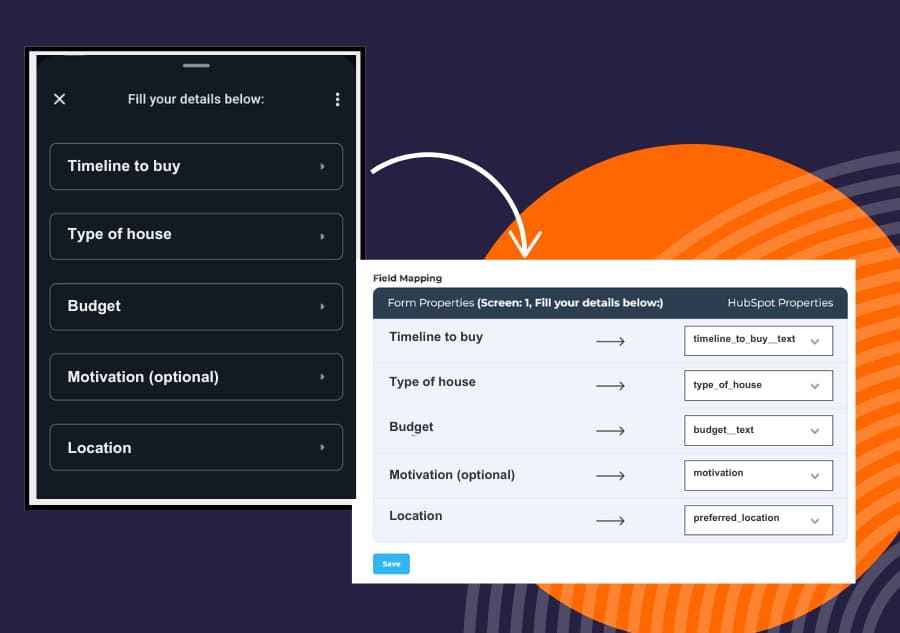
Use WhatsApp Forms to Capture and Qualify Leads Instantly
Build interactive WhatsApp message flows in your Meta account, like “What’s your budget?” or “Choose your use case,” and trigger them from HubSpot using workflows. You can map each response to HubSpot contact properties, so your CRM updates automatically as the conversation happens. Capture leads as they reply and sync everything to HubSpot.
Send Bulk WhatsApp Campaigns on ANY HubSpot Plan
With Vira, you can send personalized bulk WhatsApp messages to any HubSpot contact lists using Meta-approved templates. Just pick your list, choose your template, and launch your campaign. If you're on HubSpot Pro or Enterprise, you can automate sends via workflows. On Free or Starter - send them straight from Vira’s dashboard.
Track Conversations on Contact Timeline
Every WhatsApp message sent, received, and delivery status is automatically logged on the HubSpot contact timeline. That means your entire team can see the full conversation history at a glance, even if they don’t have a paid Vira seat. It’s the easiest way to keep everyone in sync and never miss context on a deal or lead.
Measure Campaign Performance and Marketing ROI
Get a clear view of how your WhatsApp campaigns are performing right inside HubSpot. Vira’s visual dashboard helps you track key results like contacts reached, replies, conversions, deals created, and deals won. Marketing teams can measure results, understand what’s working, and show real WhatsApp impact on pipeline and revenue.
Tool Information
Want To List Your Product?
Reach thousands of potential users by listing your SaaS on FindYourSaaS.
Get Started Free